

Imagine a potential customer clicking your link on Google, only to leave because your page takes too long to load. In 2026, slow loading screens destroy conversions because mobile users demand instant results and seamless browsing. By implementing advanced Mobile Website Speed Optimization Techniques, you can fix layout lag, slash bounce rates, and turn frustrated visitors into loyal clients.
Why Mobile Speed Rules the Digital Landscape
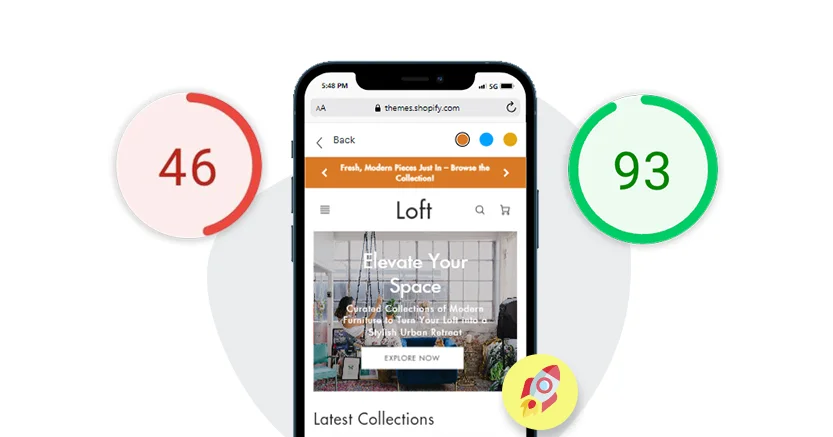
Google strictly uses mobile-first indexing, meaning the search engine evaluates your mobile site first to determine your search rankings. A slow mobile site directly damages your visibility on search engine results pages (SERPs), killing your organic traffic before users even see your content. Beyond basic SEO, page speed directly dictates your conversion rates; fast sites build immediate trust and encourage users to explore more pages, while sluggish performance drives bounce rates through the roof. If managing these technical details feels overwhelming, partnering with an experienced SEO Agency for Rankings ensures your mobile platform remains fully optimized, secure, and ahead of the competition.
Core Mobile Website Speed Optimization Techniques
1. Optimize and Compress Visual Assets
Images and videos usually make up the bulk of a webpage’s weight. Standard image formats like JPEG or PNG slow down mobile devices, which often rely on weaker processors and variable cellular connections than desktop computers.
- Switch to Next-Gen Formats: Convert all your images to WebP or AVIF formats. These file types offer superior compression without sacrificing visual quality.
- Implement Proper Resizing: Do not upload a massive desktop-sized image and rely on CSS to shrink it. Serve responsively sized images that match the user’s mobile screen dimensions.
- Use Heavy Compression: Use automated tools to strip unnecessary metadata from your image files before they ever go live on your server.
2. Implement Aggressive Lazy Loading
Why force a user’s phone to download images at the bottom of a page before they even scroll down? Lazy loading ensures that browsers only fetch images, videos, and scripts when they enter the user’s viewport.
- Set the
loading="lazy"attribute on all non-essential images and iframes. - Exclude above-the-fold images, like your main logo or hero image, from lazy loading so they appear instantly when the page loads.
- Boosting your site speed is just one piece of the puzzle. To fully dominate your neighborhood market, check out our proven Local SEO Tips for Small Businesses to drive more foot traffic today.
3. Minify and Combine Code Files
Bloated code slows down browsers because the system has to read through every single line of extra space and unnecessary text. Clean up your site’s architecture by streamlining your CSS, JavaScript, and HTML.
- Remove Unnecessary Code: Strip out comments, formatting spaces, and unused code blocks.
- Defer Non-Essential JavaScript: Instruct the browser to load critical structural elements first, leaving heavy background scripts to load only after the page becomes interactive.
- Consolidate Files: Combine multiple smaller CSS or script files into single files to reduce the total number of requests a mobile device has to send to your server.
4. Upgrade to Next-Gen Hosting and Utilize CDNs
Your website’s speed depends heavily on your server’s initial response time. Traditional, cheap shared hosting setups fail under the demands of modern mobile traffic.
- Deploy a Content Delivery Network (CDN): A CDN stores copies of your website on servers across the globe. When a user in New York visits your site, the CDN serves the data from a local New York server rather than a distant main server, drastically reducing latency.
- Enable Advanced Server Caching: Set up robust caching rules so returning visitors do not have to download the exact same assets twice.
- Looking to build a secure, fast, and scalable platform for your business? Check out our professional Website Development Services page for expert solutions.
5. Prioritize Core Web Vitals (CWV)
Google judges your site speed through specific metrics known as Core Web Vitals. To win the speed race, you must understand and optimize for these targeted benchmarks:
- Largest Contentful Paint (LCP): This measures how long it takes for the main content of your page to load. Aim for an LCP of 2.5 seconds or faster.
- Interaction to Next Paint (INP): This tracks user interface responsiveness. Your page must react quickly when a user taps a button or menu link.
- Cumulative Layout Shift (CLS): This measures visual stability. Ensure text and buttons do not jump around unexpectedly while images load, preventing accidental clicks.
Step-by-Step Mobile Optimization Checklist
To streamline your optimization process, follow this quick-reference checklist:
- [ ] Test your current speeds using Google PageSpeed Insights and WebPageTest.
- [ ] Compress all site images and convert them to WebP format.
- [ ] Turn on text compression (Gzip or Brotli) on your hosting server.
- [ ] Audit your plugins and third-party tracking scripts, deleting any that you do not use.
- [ ] Fix visual layout shifts by specifying height and width dimensions for all images.
- [ ] Update your website to support HTTP/3 for faster network data transfers.
- Managing your speed is just one part of running a successful site. To ensure your platform stays glitch-free year-round, check out our comprehensive insights on Website Maintenance for Small Businesses today.
Critical Mobile Website Speed Optimization Techniques to Implement
Start implementing these techniques immediately:
- Enable GZIP compression on your server to reduce file transfer sizes by up to 70%.
- Use a Content Delivery Network (CDN) to serve images and static files from locations closest to your users.
- Minify CSS files to remove unnecessary characters without changing functionality.
- Reduce server response time by optimizing database queries and upgrading your hosting.
- Remove render-blocking resources and prioritize above-the-fold content.
- Limit third-party scripts that track user behavior or display ads.
Partner with the Experts: Feynix Solution
- Resolving complex website lags requires deep technical expertise, continuous testing, and significant time, assets that busy business owners cannot afford to waste.
- Partnering with experts allows you to focus entirely on scaling your business and serving clients, rather than spending days debugging code or configuring servers.
- As a premier digital partner, Feynix Solution specializes in transforming slow, underperforming websites into high-speed, high-converting platforms.
- Their expert team meticulously analyzes your codebase, accelerates server response times, cleans bloated databases, and aligns your infrastructure perfectly with Google’s latest performance standards.
- By trusting Feynix Solution with your web infrastructure, you automatically safeguard your search engine rankings, keep mobile visitors fully engaged, and maximize your conversion rates.
Customer Reviews
1. “Our mobile bounce rate was incredibly high because our product pages took forever to load. We hired Feynix Solution, and their team optimized our entire site framework. Our loading times dropped under two seconds, and our sales immediately scaled up.” — Sarah Jenkins, Austin, TX
2. “I didn’t have the time or coding skills to fix our server bottlenecks. The team at Feynix Solution took over our web infrastructure and aligned everything with Google’s Core Web Vitals. Our mobile traffic has never been this active.” — Michael Chang, San Francisco, CA
3. “After a major update, our mobile speed ranking collapsed. Feynix Solution diagnosed the bloated code blocks and compressed our entire media library within days. They saved our organic search traffic.” — Amanda Ross, Miami, FL
4. “We knew slow mobile speeds were costing us clients, but we didn’t know how to fix it. Feynix Solution simplified the entire process, cleaned our databases, and gave our users an instant browsing experience.” — David Miller, Denver, CO
5. “Feynix Solution delivers exactly what they promise. They turned our sluggish business site into a lightning-fast platform, and our mobile inquiries skyrocketed almost immediately.” — Jessica Taylor, Columbus, OH
People Also Asked (PAA)
1. How does mobile website speed affect my Google rankings?
Google uses mobile-first indexing, which means it evaluates your mobile site’s speed and performance to determine your search placement. A slow mobile site directly triggers lower rankings, while fast platforms win top visibility on search results pages.
2. Why does my website load fast on desktop but slow on mobile?
Mobile devices run on weaker processors than desktops and frequently connect through fluctuating cellular networks. If your site contains uncompressed images, heavy scripts, or unoptimized CSS, mobile browsers struggle to process the data quickly.
3. What is a good loading time for a mobile website in 2026?
Your mobile website should load in under 2 seconds. Studies show that bounce rates increase dramatically with every additional second, making speed critical for keeping visitors engaged.
4. Do plugins affect mobile loading speeds?
Yes. Every plugin adds extra CSS and JavaScript that the mobile browser must download and read. Limiting your active plugins to essential tools prevents code bloat and maintains fast loading speeds.
5. Can a Content Delivery Network (CDN) fix my mobile speed issues?
A CDN significantly improves speed by caching your website data on a global network of servers. It automatically delivers content to your mobile users from the nearest physical server, slashing data travel time.
Conclusion
Maximizing your mobile performance is not a one-time project; it requires continuous monitoring, regular testing, and proactive adaptation to changing search engine algorithms. By implementing these cutting-edge Mobile Website Speed Optimization Techniques, you ensure that your business remains highly competitive, visible on search pages, and profitable throughout the fiscal year. Every second of delay erodes customer trust and actively shrinks your profit margins. Audit your site today, optimize your visual files, clean up your bloated backend code, and collaborate with professional teams like Feynix Solution to give your users the lightning-fast, instantaneous mobile experience they deserve.
Dominate Mobile Traffic with Feynix Solution’s Performance Optimization
Ready to slash bounce rates, maximize user engagement, and crush your competition on mobile screens? Feynix Solution delivers cutting-edge infrastructure engineering using advanced Mobile Website Speed Optimization Techniques. Our technical specialists overhaul your backend framework to secure fast loading times, elevate your conversion rates, and safeguard your search engine visibility.
Accelerate Your Platform Growth Today
- Ready to upgrade your web architecture and deliver flawless digital experiences? Contact our development team at info@feynixsolution.com to review your site speed metrics and learn how our custom performance strategies can increase your revenue.
- Visit our Contact Us to sync with our optimization experts and explore our comprehensive Web Performance Optimization services.
Secure Rapid Loading and Convert Every Mobile Click
At Feynix Solution, we specialize in Core Web Vitals alignment, responsive image compression, database cleanup, and script deferral. Stay connected with our engineering squad for the latest site health updates and mobile speed breakthroughs:
Choose Feynix Solution to equip your brand with a lightning-fast, high-performing website that turns impatient mobile visitors into long-term buyers.
About the Author
The Feynix Solution Team consists of elite web optimization specialists, developers, and digital growth strategists dedicated to maximizing online performance. We engineer high-speed digital experiences that help businesses secure top search engine rankings, reduce bounce rates, and turn mobile traffic into predictable revenue. Through cutting-edge code refinement and advanced server optimization, we build the fast-paced web infrastructure that modern businesses need to thrive.