So, you’ve decided to build a website for your small business – great move. But here’s the truth: launching a website without a clear plan is like opening a store without a sign, a cash register, or even a front door. A lot of small business owners jump straight into design and miss the critical steps that actually make a website work. That’s where a proper website development checklist for small business comes in handy.
Whether you’re starting from scratch or revamping an existing site, following a solid checklist keeps you organized, saves you money, and sets you up for real, measurable growth. Let’s walk through everything you need to cover, step by step.
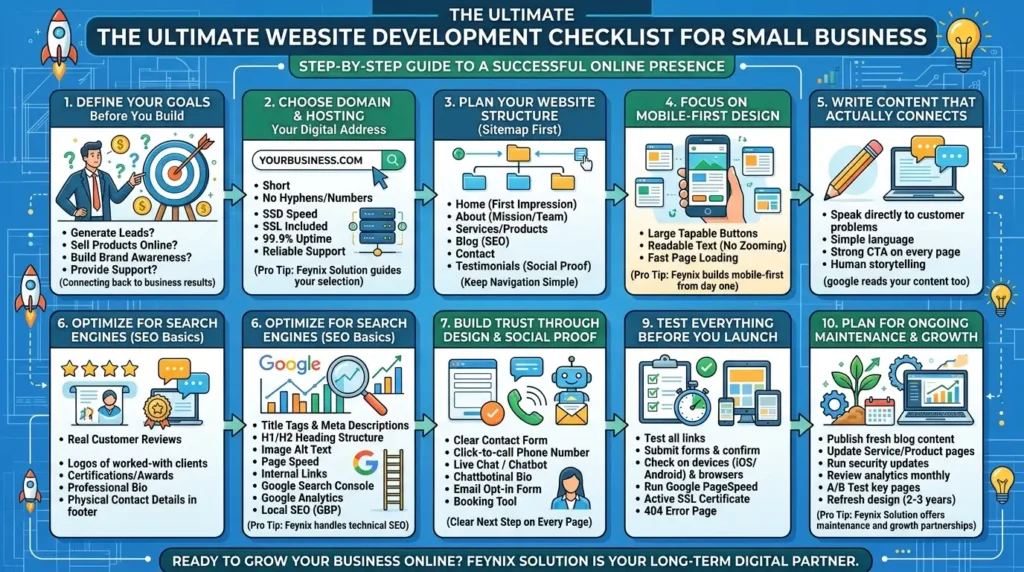
1. Define Your Goals Before You Build Anything
Before you pick a color scheme or write a single line of code, you need to answer one question: What do you want your website to do?
Ask yourself:
- Do you want to generate leads and phone calls?
- Are you selling products directly online?
- Is the goal to build brand awareness and credibility?
- Do you need to provide customer support or resources?
2. Choose the Right Domain Name and Hosting
Your domain name is your digital address. Keep it short, easy to spell, and connected to your brand. Avoid hyphens and numbers—they confuse people. For hosting, don’t go cheap just to save a few dollars a month. Slow hosting kills your rankings and frustrates visitors. Look for a plan that offers:
- Fast server speeds (look for SSD-based hosting)
- SSL certificate included
- At least 99.9% uptime guarantee
- Reliable customer support
A professional team like Feynix Solution can guide you through selecting the right hosting environment based on your business size, expected traffic, and budget, so you’re not overpaying for features you don’t need or struggling with a server that can’t handle your growth.
3. Plan Your Website Structure (Sitemap First)
Think of your sitemap as the blueprint of your house. Before you furnish it, you need to know where the rooms go.
A basic small business website typically needs:
- Home: First impression, clear value proposition
- About: Who you are, your mission, your team
- Services or Products: What you offer and why it matters
- Blog: Fresh content that drives SEO
- Contact: Make it easy for people to reach you
- Testimonials or Case Studies: Social proof that builds trust
Keep the navigation simple. If a visitor can’t find what they need in three clicks or less, they’ll leave. This is especially important when working with professional Website Design and Development Services.
4. Focus on Mobile-First Design
Here’s a fact you can’t ignore: more than 60% of web traffic in the U.S. now comes from mobile devices. If your website doesn’t look great and work smoothly on a smartphone, you’re handing customers to your competitors.
‘Mobile-first design means:
- Buttons are large enough to tap with a thumb
- Text is readable without zooming in
- Pages load fast even on a 4G connection
- Navigation menus collapse cleanly on small screens
Feynix Solution builds websites with a mobile-first approach from day one, not as an afterthought. This makes a huge difference in how both users and search engines experience your site.
5. Write Content That Actually Connects
Design grabs attention. Content keeps it. A lot of small business websites make the mistake of writing everything from the company’s point of view. Instead, speak directly to your customer’s problems and how you solve them.
Strong website content:
- Uses clear, simple language (no jargon)
- Answers common customer questions
- Includes a strong call-to-action on every key page
- Tells your story in a way that feels real and human
6. Optimize for Search Engines (SEO Basics)
You can have the most beautiful website in the world, but if nobody finds it, it doesn’t matter. SEO isn’t just a buzzword; it’s how people discover your business when they search online.
Your basic SEO checklist should include:
- Title tags and meta descriptions on every page.
- H1, H2, and H3 heading structures are used properly.
- Image alt text describing every image.
- Page speed optimization compress images, use caching.
- Internal links connecting your pages to each other.
- Google Search Console set up and verified.
- Google Analytics installed to track traffic and behavior.
- Local SEO: Claim and optimize your Google Business Profile.
Feynix Solution handles technical SEO as part of every website build, so you’re not starting at zero when your site goes live.
7. Build Trust Through Design and Social Proof
First impressions happen in less than a second. Your website design needs to look professional, consistent, and trustworthy. This doesn’t mean spending a fortune; it means being intentional.
Trust signals to include:
- Real customer reviews and testimonials
- Logos of clients you’ve worked with (if applicable)
- Certifications, awards, or industry memberships
- A professional headshot and bio on your About page
- A physical address and phone number in the footer
8. Set Up Your Contact and Conversion Tools
Getting traffic to your site is great. Converting that traffic into leads or customers is the real goal.
Make sure you have:
- A clear contact form on your Contact page (and optionally on other pages)
- Click-to-call phone number for mobile users
- Live chat or chatbot to capture visitors in real time
- Email opt-in form to build your subscriber list
- Booking or scheduling tool if appointments are part of your service
Every page should have at least one clear next step for the visitor to take. Don’t make them hunt for it.
9. Test Everything Before You Launch
- Test all links, internal and external, for broken paths
- Submit a contact form yourself and confirm you receive it
- Check how the site looks on iPhone, Android, and desktop
- Test in multiple browsers (Chrome, Safari, Firefox, Edge)
- Run your site through Google PageSpeed Insights
- Make sure your SSL certificate is active (look for the padlock in the browser)
- Check that your 404 error page is set up properly
Skipping this step can mean launching with broken forms, slow pages, or display issues that turn customers away before they’ve even read a word.
10. Plan for Ongoing Maintenance and Growth
A website is never truly “done”. Treat it like a living part of your business that needs regular attention.
Your ongoing website tasks should include:
- Publishing fresh blog content consistently
- Updating service or product pages as your offerings evolve
- Running software, plugin, and security updates regularly
- Reviewing analytics monthly to understand what’s working
- Running A/B tests on key pages to improve conversion rates
- Refreshing design elements every 2–3 years to stay current
Feynix Solution offers ongoing website maintenance and growth partnerships for small businesses, so you don’t have to figure all of this out alone. They act as a long-term digital partner, not just a one-time vendor.
People Also Asked
Q1: What should a small business include on its website?
Every small business website needs these core pages: Home, About, Services, Contact, and a Blog. Make sure you add clear calls-to-action, a mobile-friendly design, fast load speed, and your business contact details. Keep it simple, professional, and easy to navigate.
Q2: How much does it cost to build a small business website?
Costs vary based on your needs. A basic website can start at $500–$2,000, while a custom-built site with advanced features runs $3,000–$10,000+. Feynix Solution offers flexible packages for small businesses, so you get professional results without overspending your budget.
Q3: How long does it take to develop a small business website?
A simple website typically takes 2–4 weeks. A more complex site with custom features can take 6–12 weeks. The timeline depends on how quickly you provide content, feedback, and approvals. Working with an experienced team like Feynix Solution keeps the process on track and on schedule.
Q4: Do I need SEO when I build my small business website?
Yes, absolutely. SEO helps people find your business on Google. You should set it up from day one, not after launch. This includes proper page titles, meta descriptions, fast loading speed, and keyword-rich content. Feynix Solution builds every website with SEO best practices already in place.
Q5: Can I update my small business website myself after it’s built?
Yes, most modern websites use a CMS like WordPress, which lets you update content without coding skills. You can add blog posts, edit text, and update images on your own. Feynix Solution also offers maintenance support if you ever need a helping hand with updates or technical fixes.
Final Thoughts
Building a successful small business website takes more than a pretty design. It requires strategy, structure, strong content, technical know-how, and a commitment to continuous improvement. Use this website development checklist for small business as your roadmap, and don’t try to rush through it. When you need expert support at any stage of this process, Feynix Solution brings the experience, the tools, and the team to help your website become a genuine growth engine for your business.
Ready to build a website that actually grows your business? Contact Feynix Solution today and let’s get started! Start with a plan. Build with purpose. Grow with consistency.
About the Author
The content is created with support and expertise from the Feynix Solution Team, a professional web development team dedicated to building high-performing, SEO-friendly, and conversion-focused websites for small businesses. This article is written by a digital content specialist focused on helping small businesses in the USA build strong online identities through effective website strategies.