Managing a modern website is no longer just about publishing a few pages online. Businesses today need fast updates, SEO-friendly structures, secure content management, mobile responsiveness, and seamless collaboration between teams. That is exactly where a Content Management System (CMS) changes the game.
Whether you run a startup, eCommerce store, corporate website, or blog, the right CMS can simplify your entire digital workflow. From updating content without coding to improving search engine rankings, the benefits of CMS development go far beyond convenience.
At Feynix Solution, we have worked with businesses that struggled with slow website updates, poor SEO performance, and limited scalability. After switching to CMS-driven solutions, many experienced faster growth, improved search visibility, and smoother team collaboration. In this guide, you will learn how CMS development helps businesses manage content efficiently while improving SEO performance in 2026 and beyond.
What Is CMS Development?
CMS development refers to building and customizing a Content Management System that allows users to manage website content without advanced coding knowledge.
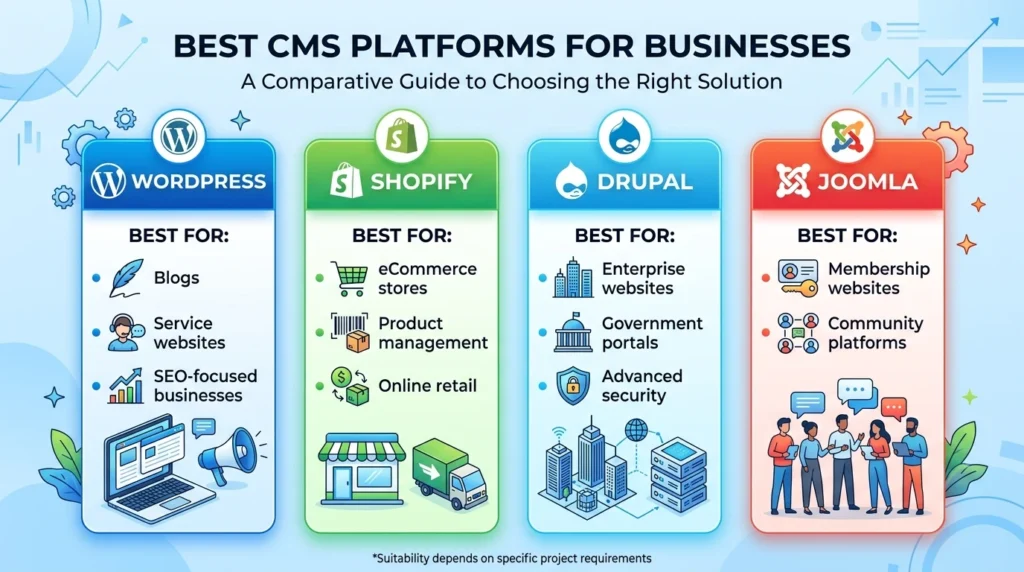
Popular CMS platforms include:
- WordPress
- Shopify
- Drupal
- Joomla
A CMS helps businesses:
- Publish content quickly
- Manage multiple pages
- Optimize SEO settings
- Control media files
- Improve website scalability
- Collaborate with teams
For growing brands, CMS development creates a strong foundation for digital marketing and online visibility.
Why Businesses Use CMS Platforms
Many companies initially start with static websites. However, as content grows, managing updates manually becomes difficult.
A CMS solves this problem by providing:
| Feature | Benefit |
|---|---|
| Dashboard Management | Easy content editing |
| SEO Controls | Better search visibility |
| Plugins & Integrations | Extended functionality |
| User Roles | Team collaboration |
| Mobile Responsiveness | Better user experience |
| Scalability | Business growth support |
This is why modern businesses increasingly invest in professional Website Design and Development Services to build scalable CMS-driven websites.
Benefits of CMS Development
1. Easy Content Updates Without Coding
One of the biggest benefits of CMS development is the ability to update content without technical skills.
Instead of contacting developers for every small change, teams can:
- Publish blog posts
- Update service pages
- Add products
- Edit images
- Change banners
This saves both time and operational costs.
Featured Snippet Opportunity
A CMS helps with content management by allowing businesses to create, edit, organize, and publish website content without coding knowledge. It improves workflow efficiency, collaboration, SEO performance, and website scalability.
2. Better SEO Performance
Modern CMS platforms include built-in SEO tools that show creators how does cms help seo by making it easy to optimize meta tags, clean up site structure, and help websites rank higher in search engines.
CMS SEO Features Include:
- Custom meta titles
- Meta descriptions
- XML sitemaps
- SEO-friendly URLs
- Image optimization
- Internal linking
- Mobile responsiveness
For example, businesses using properly optimized CMS platforms often experience improved indexing and faster ranking growth. At Feynix Solution, we recommend structured CMS optimization for long-term SEO success.
3. Faster Website Management
Without a CMS, website updates can become complicated and time-consuming.
A CMS simplifies workflows by offering:
- Drag-and-drop editors
- Reusable templates
- Centralized dashboards
- Media management systems
This allows businesses to focus on growth instead of technical maintenance.
4. Improved Team Collaboration
Modern CMS systems support multiple user roles.
Teams Can:
- Write content
- Review drafts
- Approve pages
- Publish updates
- Manage SEO settings
This is especially useful for marketing teams, agencies, and large businesses.
5. Better Scalability
As your business grows, your website should grow with it.
CMS development allows businesses to:
- Add new pages
- Expand blogs
- Launch eCommerce sections
- Integrate tools
- Increase traffic capacity
This flexibility is one reason businesses invest in scalable web application development services.
How CMS Improves Content Management
Organized Content Structure
A CMS helps organize content into categories, tags, menus, and archives.
This improves:
- Navigation
- User experience
- Search engine crawling
- Content discoverability
Media Management
Managing images and videos manually can become chaotic.
CMS platforms provide centralized media libraries that simplify:
- Uploading
- Editing
- Compression
- Reuse across pages
Content Scheduling
Businesses can schedule posts in advance.
This helps maintain consistent publishing strategies for:
- Blogs
- News updates
- Product launches
- Marketing campaigns
Workflow Automation
Many CMS platforms automate repetitive tasks like:
- Content approval
- SEO checks
- Backups
- Plugin updates
This improves efficiency significantly.
How CMS Helps SEO Performance
SEO-Friendly URL Structures
CMS platforms generate clean URLs such as:
example.com/cms-development-benefits
Instead of:
example.com/page?id=123
Search engines prefer readable URLs.
Faster Mobile Optimization
Google prioritizes mobile-first indexing.
Most modern CMS platforms support responsive design automatically, improving:
- Mobile usability
- Bounce rates
- Rankings
Better Internal Linking
Internal linking improves topical authority.
A CMS makes it easier to connect:
- Service pages
- Blog articles
- Product categories
Suggested anchor texts:
- benefits of cms development
- scalable website solutions
- custom CMS development
- SEO-friendly websites
- business website management
Plugin-Based SEO Enhancements
Popular CMS plugins help businesses optimize:
- Keywords
- Readability
- Schema markup
- Technical SEO
For example:
- Yoast SEO
- Rank Math
Better Website Speed Optimization
Website speed directly impacts rankings and conversions.
A properly configured CMS supports:
- Caching
- Image compression
- CDN integration
- Minified scripts
WordPress Theme vs Custom Website Design
Businesses often ask whether they should use a ready-made theme or invest in custom development.
| WordPress Theme | Custom Website Design |
|---|---|
| Faster launch | Fully customized |
| Lower initial cost | Better scalability |
| Limited flexibility | Unique branding |
| Shared layouts | Optimized performance |
| Easier setup | Advanced functionality |
For small businesses, themes can work well initially. However, growing companies often prefer custom CMS solutions for long-term flexibility.
How Long Does it Take to Build a Website
The timeline depends on complexity.
| Website Type | Estimated Timeline |
|---|---|
| Small Business Website | 2–4 Weeks |
| CMS Blog Website | 3–6 Weeks |
| Custom CMS Website | 6–12 Weeks |
| benefits of cms development | 3–6 Months |
Factors affecting development time include:
- Design complexity
- CMS customization
- SEO setup
- Content migration
- Integrations
Professional web application development services can significantly reduce delays through proper planning.
Common CMS Mistakes to Avoid
Ignoring SEO Settings
Many businesses launch CMS websites without optimizing:
- Meta tags
- URL structures
- Heading hierarchy
This hurts rankings.
Installing Too Many Plugins
Excessive plugins can:
- Slow websites
- Create security risks
- Cause compatibility issues
Weak Security Practices
CMS platforms require:
- Regular updates
- Secure hosting
- Strong passwords
- Firewall protection
Poor Content Organization
Disorganized content confuses users and search engines.
Use categories and internal linking strategically.
Best CMS Platforms for Businesses
Real-World Insights From Feynix Solution
At Feynix Solution, we worked with a retail business struggling to update product pages quickly.
Their old static website required developer involvement for every small change. After migrating to a CMS-based solution:
- Content updates became 70% faster
- Organic traffic improved within months
- Product management became easier
- SEO rankings improved due to structured optimization
This demonstrates how the benefits of CMS development directly impact business efficiency and online growth.
Customer Testimonials
Sarah Mitchell – Texas, USA
Feynix Solution completely transformed how we manage our website. Our team can now update pages without waiting for developers, and our SEO rankings improved steadily.
Ahmed Raza – Karachi, Pakistan
We needed a scalable CMS for our growing business. The solution delivered by Feynix Solution made content management incredibly easy.
Daniel Cooper – London, UK
Their CMS development expertise helped us organize thousands of pages efficiently while improving site speed and search visibility.
People Also Asked
What is the main purpose of a CMS?
A CMS helps businesses create, manage, and publish website content without advanced coding knowledge.
Why is CMS important for SEO?
CMS platforms simplify SEO optimization through meta management, internal linking, structured URLs, and mobile responsiveness.
Can a CMS handle eCommerce websites?
Yes. Platforms like Shopify and WooCommerce support full eCommerce functionality.
Is WordPress better than custom coding?
It depends on project goals. WordPress offers flexibility and faster deployment, while custom coding provides unique scalability and control.
How often should a CMS be updated?
CMS platforms should be updated regularly for security, performance, and compatibility improvements.
Conclusion
Modern businesses need more than just a website. They need a platform that supports growth, improves SEO performance, and simplifies content management.
The benefits of CMS development include:
- Easier content publishing
- Better SEO optimization
- Faster updates
- Improved collaboration
- Enhanced scalability
- Long-term flexibility
Whether you run a startup or enterprise business, investing in the right CMS solution can significantly improve your digital performance.
At Feynix Solution, we help businesses build scalable, SEO-friendly CMS solutions tailored for growth.





2 Responses
One thing that really stands out is how a well-structured CMS supports both faster content updates and stronger SEO performance at the same time. A lot of businesses focus only on publishing content, but features like clean URL structures, mobile responsiveness, and easier collaboration between teams can make a huge difference in long-term search visibility and workflow efficiency.
A concrete detail often missed in CMS setups: pagination and filter URLs generate massive duplicate content. Our approach for handling this programmatically is documented in a post about programmatic SEO that saved us from crawl waste.